Withdrawal from contract – button in delivery e-mails
How to turn on and set up the withdrawal button in delivery e-mails (EU 2023/2673) – variables in the link and settings for Retino and Shoptet.
Where to set it up
Open “Communication” → “Mailing” and select a delivery e-mail template.
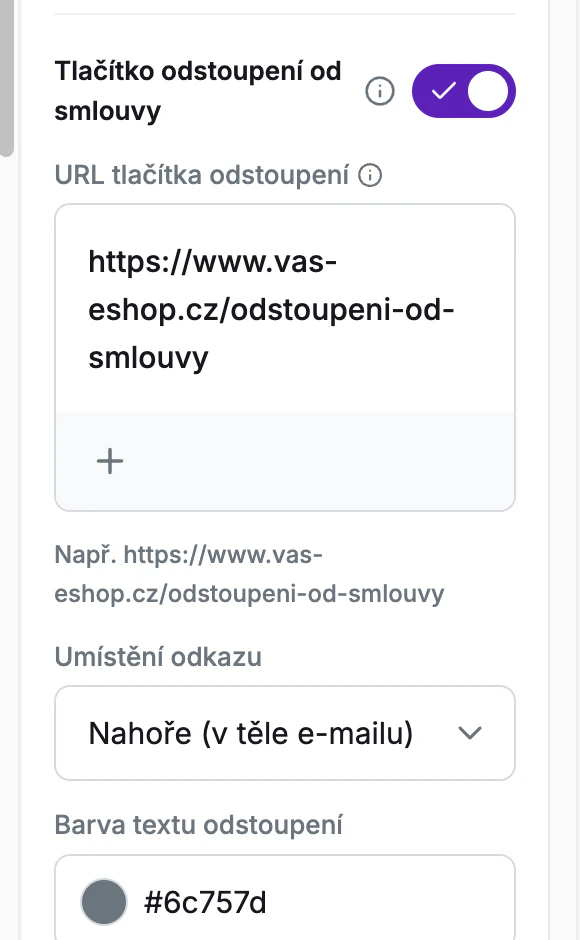
1) Turning it on (Modules tab)
Turn on the “Withdrawal button” toggle.
4) Placement and color (Modules tab)
In the “Link placement” field, choose where the button appears in the e-mail: “Top (in e-mail body)” (default – below the main text of the e-mail) or “Bottom (in footer)”. In the “Withdrawal text color” field, you can change the color of the button text; by default, it has the color of the footer text.
Settings for Retino
If you use Retino, paste a direct link to your Retino instance with the variables into the URL field. Build it from these parts (all on one line, without spaces):
https://app.retino.com/cs/portal/direct-link/[RETINO_ID_ESHOPU]/?email={customerEmail}&order_code={orderNumber}&portal_url=[STRANKA_S_INFORMACEMI_K_VRATKAM]
[RETINO_ID_ESHOPU] is the ID of your e-shop’s instance in Retino (you’ll find it in the Retino admin, in the direct link). [STRANKA_S_INFORMACEMI_K_VRATKAM] is the page with information on returns and claims, e.g. https://www.vaseshop.cz/returns-claims/.
Settings for Shoptet
As of 19 June 2026, Shoptet has its own system page for withdrawing from the contract. If you don’t use Retino, you can point the button to it:
- CZ: https://www.vaseshop.cz/moje-objednavka
- SK: https://www.vaseshop.sk/moja-objednavka
- DE: https://www.vaseshop.de/meine-bestellung
- HU: https://www.vaseshop.hu/rendelesem
- PL: https://www.vaseshop.pl/moje-zamowienie
- RO: https://www.vaseshop.ro/comanda-mea
- DA, EL, EN, ES, ET, FI, FR, HR, IT, LT, LV, NL, PT, SL, SV: https://www.vaseshop.[domena]/my-order
For a newly created e-mail template, Foxdeli fills in this address automatically based on the domain and language of your default market. For existing templates, add it manually.
The /moje-objednavka/ page has to be published on your e-shop (in Shoptet: Settings → Orders → Other settings, section “Withdrawal from order and goods”).
On this page, the customer enters the order number and their e-mail address.
Note: this is a separate Shoptet system page, not a direct link to a specific order.
Analytics
You can see how many customers clicked the button in “Analytics” → “Mailing”, in the “Click performance” overview under the “Withdrawal from Contract” item.
FAQ
- Why isn’t the button showing? Check that the toggle is on and the URL is filled in.
- Where do the e-mail address and order number come from? From the data of the order that Foxdeli processes; they are filled in only when the e-mail is sent.
This article is a general overview of the changes, not legal advice.
Still have questions?
Contact usMore articles in this category
- Billing address in e-mails by delivery method
- Brick-and-mortar pickup places for personal pickup
- Campaigns – a banner in e-mails and on the Track & Trace page
- Delayed due to carrier time constraints – a workflow status
- Duplicating templates, campaigns and workflows
- E-mails and SMS in the order timeline
- Emoji in the e-mail, Track & Trace and SMS editors
- Fallback SMS when an e-mail doesn't arrive
- Order Issues
- Orders in the Seznam Email order overview
- Preview text of delivery e-mails
- Sending e-mails from your own domain (DKIM verification)
- SMS statistics
- SMS to customers
- Undelivered message alerts
- What you'll find on the Dashboard
- Recommended products
- UTM parameters in links
- Payment details in the order summary
- Attachments in e-mails
- Auto-filling data in the e-mail subject
- Customer PIN code in the e-mail
- Info banner
Articles in this category
- Billing address in e-mails by delivery method
- Brick-and-mortar pickup places for personal pickup
- Campaigns – a banner in e-mails and on the Track & Trace page
- Delayed due to carrier time constraints – a workflow status
- Duplicating templates, campaigns and workflows
- E-mails and SMS in the order timeline
- Emoji in the e-mail, Track & Trace and SMS editors
- Fallback SMS when an e-mail doesn't arrive
- Order Issues
- Orders in the Seznam Email order overview
- Preview text of delivery e-mails
- Sending e-mails from your own domain (DKIM verification)
- SMS statistics
- SMS to customers
- Undelivered message alerts
- What you'll find on the Dashboard
- Recommended products
- UTM parameters in links
- Payment details in the order summary
- Attachments in e-mails
- Auto-filling data in the e-mail subject
- Customer PIN code in the e-mail
- Info banner