Customer PIN code in the e-mail
You can use a customer PIN code for in-person pickup of a shipment at your brick-and-mortar store or another of your branches. The customer sees the code right in the e-mail from your e-shop and tells it to the staff at the store, which is especially handy for shipments that are already paid, without cash on delivery. This way you can always be sure that no unauthorized person picks up the shipment.
Note: this is only available to e-shops with their own API integration.
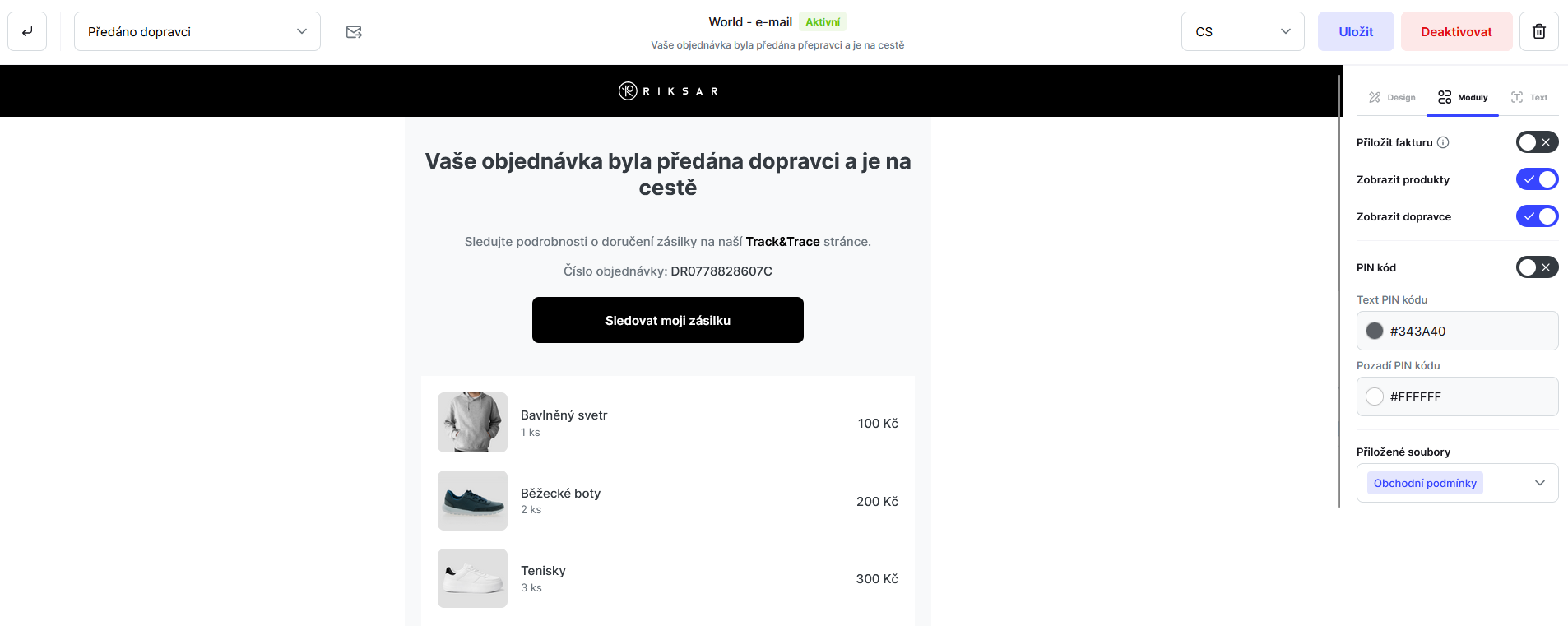
You set up the customer PIN code in the e-mail template, under Communication -> Mailing on the Modules tab. There you switch it on and set the text and background colors.
Still have questions?
Contact usMore articles in this category
- Billing address in e-mails by delivery method
- Campaigns – a banner in e-mails and on the Track & Trace page
- Duplicating templates, campaigns and workflows
- E-mails and SMS in the order timeline
- Emoji in the e-mail, Track & Trace and SMS editors
- Fallback SMS when an e-mail doesn't arrive
- Orders in the Seznam Email order overview
- Preview text of delivery e-mails
- Sending e-mails from your own domain (DKIM verification)
- SMS statistics
- SMS to customers
- Withdrawal from contract – button in delivery e-mails
- Recommended products
- UTM parameters in links
- Payment details in the order summary
- Attachments in e-mails
- Auto-filling data in the e-mail subject
- Info banner
Articles in this category
- Billing address in e-mails by delivery method
- Campaigns – a banner in e-mails and on the Track & Trace page
- Duplicating templates, campaigns and workflows
- E-mails and SMS in the order timeline
- Emoji in the e-mail, Track & Trace and SMS editors
- Fallback SMS when an e-mail doesn't arrive
- Orders in the Seznam Email order overview
- Preview text of delivery e-mails
- Sending e-mails from your own domain (DKIM verification)
- SMS statistics
- SMS to customers
- Withdrawal from contract – button in delivery e-mails
- Recommended products
- UTM parameters in links
- Payment details in the order summary
- Attachments in e-mails
- Auto-filling data in the e-mail subject
- Info banner