Fallback SMS when an e-mail doesn't arrive
When an e-mail can't be delivered to your customer, Foxdeli can send them an SMS for the same state instead. How to switch on fallback SMS, when it's sent and how much it costs.
Some e-mails never reach the customer – the address in the order has a typo, the mailbox no longer exists, or the recipient's server rejects it. For ordinary messages that's not a big deal, but when a parcel is waiting at a pickup point, the customer won't find out about it and the parcel gets returned. Fallback SMS helps with this: when the e-mail for a state can't be delivered, we send the customer an SMS for the same state instead.
How to switch on fallback SMS
- Switch on the SMS module in Modules (direct link). You'll find the steps in the article SMS to customers.
- Open Communication → Workflow and edit the workflow.
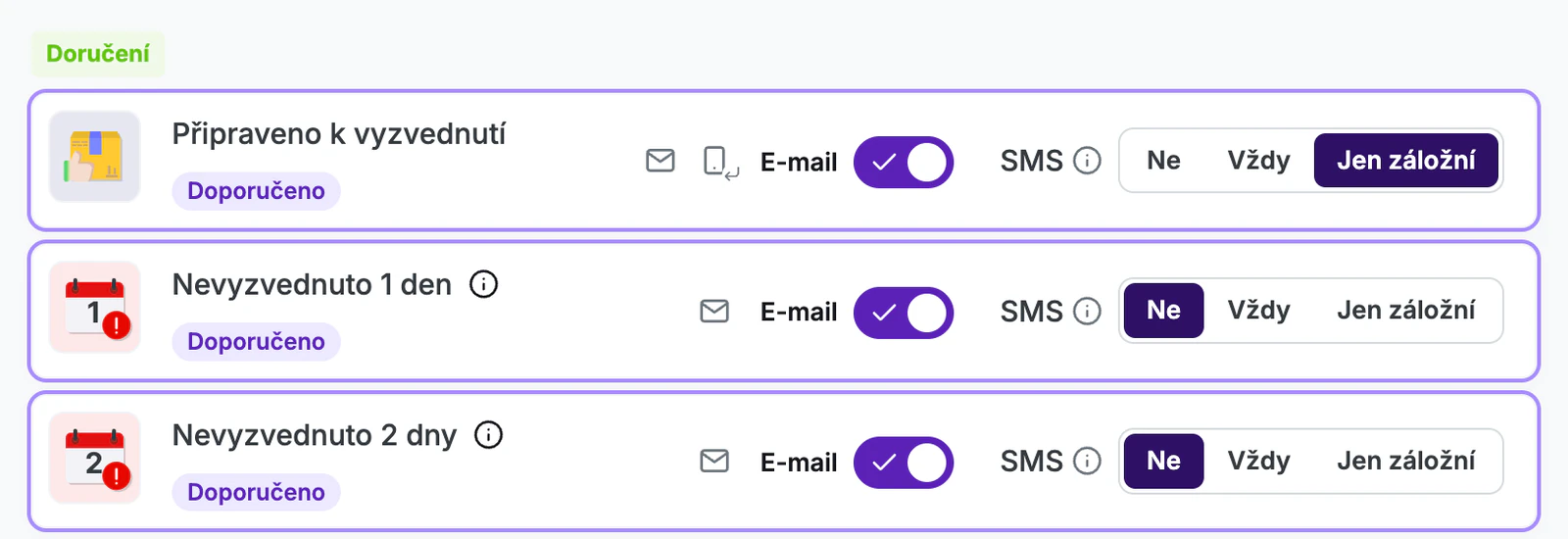
- For the state you want, keep the e-mail switched on and select “Fallback only” in the “SMS” row.
- Save your changes with the “Save” button.
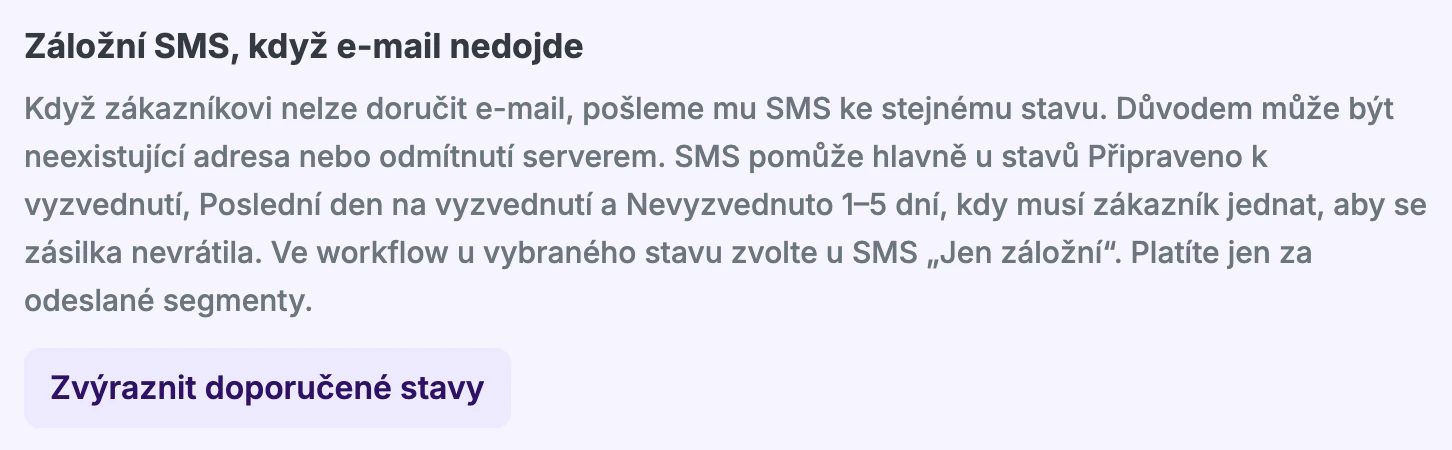
Above the workflow states, you'll find the “Fallback SMS when an e-mail doesn't arrive” tip. The “Highlight recommended states” button marks the states in which a fallback SMS most often saves a parcel from being returned: “Ready for pickup”, “Last pickup day” and “Not picked up 1–5 days”. The tip stops showing once you have fallback SMS saved for at least one state in the workflow.
The fallback SMS text is the same as the SMS text for that state in the active SMS template. You can edit it in Communication → SMS.
When a fallback SMS is sent
A fallback SMS is sent when the e-mail can't be delivered to the customer from the order because of their address:
- the address doesn't exist,
- the mailbox has been closed, is blocked or is full,
- the recipient's server doesn't accept the address,
- we didn't send the e-mail because the address didn't work before or isn't valid.
We must receive the non-delivery report within 6 hours of sending the e-mail. The SMS is then sent immediately. The customer receives a fallback SMS for the same state no more than once.
When a fallback SMS isn't sent
- There's only a temporary problem on the recipient's side. We're still trying to deliver the e-mail.
- The recipient's server rejected the e-mail for a reason other than the address, for example because a spam filter caught it.
- The customer unsubscribed from e-mails or previously marked an e-mail as spam.
- The non-delivery report arrived more than 6 hours after the e-mail was sent.
- The state has SMS set to “Always”. The customer received the SMS anyway.
- You don't send an e-mail for the state, or the market has no active e-mail template – so no e-mail was sent at all.
- The market has no active SMS template, the SMS module is switched off or the order has no phone number.
- It's a state that can repeat for an order: “Order changed”, “Delivery address changed”, “Estimated delivery” and “Estimated delivery - delayed”.
To see whether a fallback SMS can be sent for a state, hover over the SMS icon for that state in the workflow editor. If something is missing, it tells you what.
How much fallback SMS costs
You pay for a fallback SMS the same as for a regular SMS – for each segment sent, according to the SMS module price list. Fallback SMS count toward the same price tier as all other SMS. You only pay for SMS that were actually sent.
You can see how many fallback SMS were sent in the current period in the SMS module panel in Modules. Company administrators can also find them listed separately in Billing → Subscription.
In the trial version, fallback SMS count toward your free SMS.
Where you'll see fallback SMS
In the order timeline, an undelivered e-mail has the note “A fallback SMS was sent instead of the e-mail.” and the SMS has the “Fallback SMS” label. You'll also find orders with an undelivered e-mail in Order Issues. For details, see the articles E-mails and SMS in the order timeline and Undelivered message alerts.
FAQ
- Can I write a different text for the fallback SMS? Not yet. The fallback SMS uses the SMS text for that state from the active SMS template.
- Does this correct the customer's address? No. Correct the address in the order in your e-shop so that further e-mails arrive.
Still have questions?
Contact usMore articles in this category
- Billing address in e-mails by delivery method
- Campaigns – a banner in e-mails and on the Track & Trace page
- Duplicating templates, campaigns and workflows
- E-mails and SMS in the order timeline
- Emoji in the e-mail, Track & Trace and SMS editors
- Orders in the Seznam Email order overview
- Preview text of delivery e-mails
- Sending e-mails from your own domain (DKIM verification)
- SMS statistics
- SMS to customers
- Withdrawal from contract – button in delivery e-mails
- Recommended products
- UTM parameters in links
- Payment details in the order summary
- Attachments in e-mails
- Auto-filling data in the e-mail subject
- Customer PIN code in the e-mail
- Info banner
Articles in this category
- Billing address in e-mails by delivery method
- Campaigns – a banner in e-mails and on the Track & Trace page
- Duplicating templates, campaigns and workflows
- E-mails and SMS in the order timeline
- Emoji in the e-mail, Track & Trace and SMS editors
- Orders in the Seznam Email order overview
- Preview text of delivery e-mails
- Sending e-mails from your own domain (DKIM verification)
- SMS statistics
- SMS to customers
- Withdrawal from contract – button in delivery e-mails
- Recommended products
- UTM parameters in links
- Payment details in the order summary
- Attachments in e-mails
- Auto-filling data in the e-mail subject
- Customer PIN code in the e-mail
- Info banner