WE|DO Uloženka
How to connect carrier data 🚚
- Enter your shop ID (see step 2) and API key (see step 3).
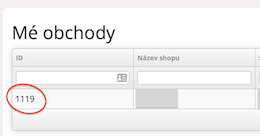
- Log in to the WE|DO (Uloženka) client zone and go to the Mé obchody (My shops) section. There you'll find the shop ID (see the image below).
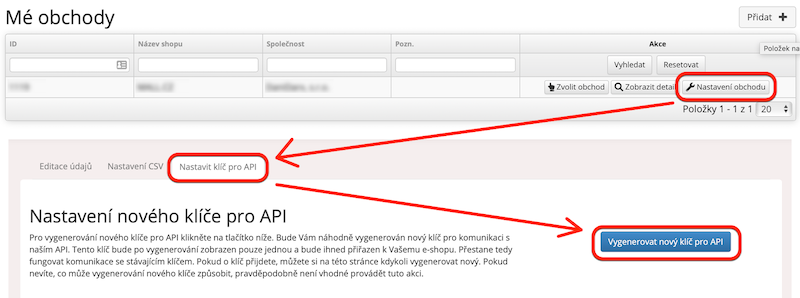
- On the Mé obchody page, click Nastavení obchodu (Shop settings) and then the Nastavit klíč pro API (Set API key) tab. Click Vygenerovat nový klíč pro API (Generate a new API key) to get the API key you need (see the image below).
If you're not sure what to do, message us in the chat and we'll be happy to help.
Still have questions?
Contact usMore articles in this category
- Boxpi
- Budbee
- Fáma Futár
- GLS Italy
- Kuryr 123
- VHL Europe
- PPL
- DODO
- FAN Courier
- Messenger
- GLS
- 123 Kurier
- Cargus
- Czech Post
- DB Schenker
- DHL
- DPD
- euShipments
- Express One
- FedEx
- Gebrüder Weiss
- Geis
- InPost
- JAPO
- Landmark
- Liftago
- Packeta (Zásilkovna)
- PBH (Pošta bez hranic)
- Poczta Polska
- Raben
- Sameday
- Slovakia Post (Slovenská pošta)
- Speedy
- Spring GDS
- SPS (Slovak Parcel Service)
- Swiss Post
- Toptrans
- UPS
- WE|DO Intime
Articles in this category
- Boxpi
- Budbee
- Fáma Futár
- GLS Italy
- Kuryr 123
- VHL Europe
- PPL
- DODO
- FAN Courier
- Messenger
- GLS
- 123 Kurier
- Cargus
- Czech Post
- DB Schenker
- DHL
- DPD
- euShipments
- Express One
- FedEx
- Gebrüder Weiss
- Geis
- InPost
- JAPO
- Landmark
- Liftago
- Packeta (Zásilkovna)
- PBH (Pošta bez hranic)
- Poczta Polska
- Raben
- Sameday
- Slovakia Post (Slovenská pošta)
- Speedy
- Spring GDS
- SPS (Slovak Parcel Service)
- Swiss Post
- Toptrans
- UPS
- WE|DO Intime