FAN Courier
How to connect carrier data 🚚
1. To connect the Fan Courier carrier to Foxdeli, you'll need your login details for the carrier's portal at https://www.selfawb.ro.
2. Log in to the carrier's portal (previous step), click your account (1), go to Profile (2) -> Agency Options (3) and copy your “Client ID”.
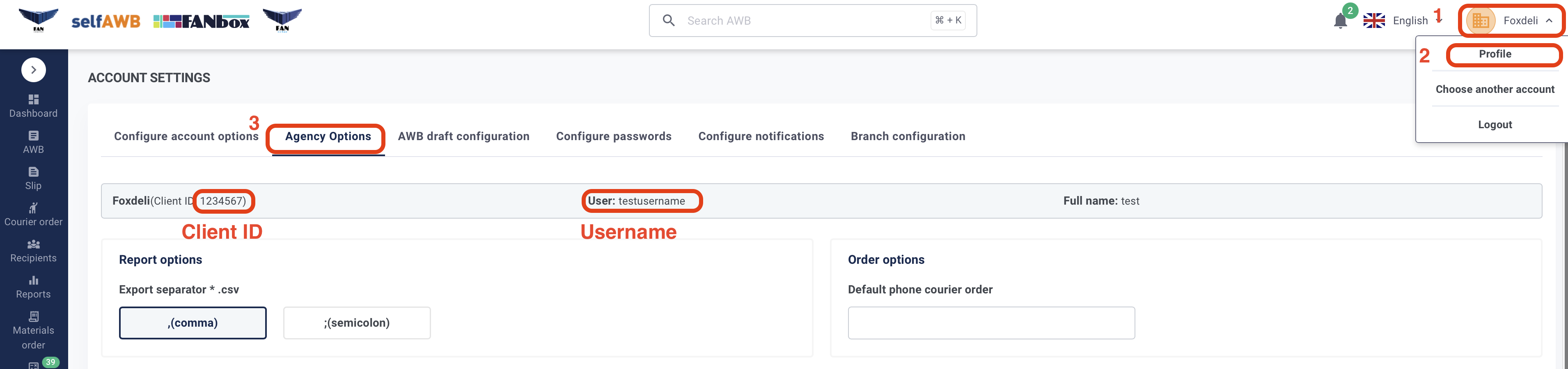
3. In the carrier connection form in Foxdeli, enter your username (Username in the picture) and password for the selfAWB portal, and then paste your Client ID (see step 2).
Still have questions?
Contact usMore articles in this category
- Boxpi
- Budbee
- Fáma Futár
- GLS Italy
- Kuryr 123
- VHL Europe
- PPL
- DODO
- Messenger
- GLS
- 123 Kurier
- Cargus
- Czech Post
- DB Schenker
- DHL
- DPD
- euShipments
- Express One
- FedEx
- Gebrüder Weiss
- Geis
- InPost
- JAPO
- Landmark
- Liftago
- Packeta (Zásilkovna)
- PBH (Pošta bez hranic)
- Poczta Polska
- Raben
- Sameday
- Slovakia Post (Slovenská pošta)
- Speedy
- Spring GDS
- SPS (Slovak Parcel Service)
- Swiss Post
- Toptrans
- UPS
- WE|DO Intime
- WE|DO Uloženka
Articles in this category
- Boxpi
- Budbee
- Fáma Futár
- GLS Italy
- Kuryr 123
- VHL Europe
- PPL
- DODO
- Messenger
- GLS
- 123 Kurier
- Cargus
- Czech Post
- DB Schenker
- DHL
- DPD
- euShipments
- Express One
- FedEx
- Gebrüder Weiss
- Geis
- InPost
- JAPO
- Landmark
- Liftago
- Packeta (Zásilkovna)
- PBH (Pošta bez hranic)
- Poczta Polska
- Raben
- Sameday
- Slovakia Post (Slovenská pošta)
- Speedy
- Spring GDS
- SPS (Slovak Parcel Service)
- Swiss Post
- Toptrans
- UPS
- WE|DO Intime
- WE|DO Uloženka